
Hello, wonderful people!
Welcome back to another journey through the fascinating realm of software engineering. This time, our vessel will take us across the open seas of Kubernetes, particularly focusing on a significant part of this landscape: Deployments.
You may wonder: Why bother with Deployments? Why not just use Pods directly? And here, my friends, lies the real magic of Kubernetes Deployments. Let’s find out!
A Gentle Introduction
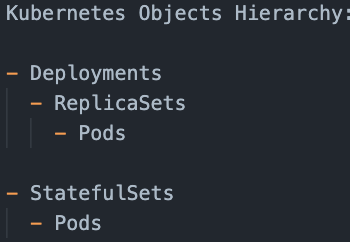
First things first, let’s define what we’re talking about. A Deployment in Kubernetes is a higher-level concept that manages ReplicaSets, which in turn manage Pods. Deployments are designed to provide declarative updates to Pods along with a lot of other features.
The Purpose of Deployments
Deployments serve many purposes, and they are primarily responsible for managing the state of your applications running on Kubernetes. They allow developers to define how their applications should be running in terms of the desired state.
Main Advantages of Deployments
- Scaling: Deployments make it easy to scale the number of Pods up and down based on the needs of your application.
- Update Handling: They handle updates to the Pods and their corresponding ReplicaSets. When you initiate an update, the Deployment will create a new ReplicaSet and increase the count of replicas while decreasing the replicas in the old ReplicaSet. This ensures a smooth transition and zero-downtime deployments.
- Rollbacks: Deployments are capable of rolling back to an earlier version of your application in case of any failure or issues.
- Paused Mode: You can pause a Deployment, make multiple updates, and then resume it, which will cause all the updates to be applied at once.
Deployments vs. Other Kubernetes Resources
Let’s now compare Deployments with other Kubernetes resources.
Deployments vs. Pods
You might ask why we wouldn’t just manage Pods directly. Pods, by themselves, are mortal. They are born and, when they die, they are not resurrected. If a node dies, the Pods running on the node die with it, and Kubernetes does not replace them. Deployments, on the other hand, ensure that your application continues running even when Pods or nodes go down.
Deployments vs. ReplicaSets
ReplicaSets are a step up from Pods. They allow you to ensure a specified number of identical Pods are always up and running. But, they lack the ability to update the Pods seamlessly and roll back to a previous version. That’s where Deployments come in. Deployments manage ReplicaSets and offer sophisticated update semantics.
Deployments vs. StatefulSets
While Deployments are great for stateless applications, Kubernetes introduced StatefulSets for applications that require stable network identifiers, stable persistent storage, and graceful deployment and scaling.
Conclusion
Deployments, ReplicaSets, Pods, and StatefulSets are all important components of Kubernetes, each serving their own purpose. Knowing when to use each can help you manage your Kubernetes applications more effectively.
In our next episode, we’ll be diving deeper into Kubernetes deployments and exploring some of its advanced features. Stay curious and keep exploring!
If you found this post helpful, you may also enjoy our upcoming topics on “Understanding Kubernetes Deployment Strategies” and “Troubleshooting Common Issues in Kubernetes Deployments.” Stay tuned!
📚 Further Reading & Related Topics
If you’re learning about Kubernetes deployments and best practices, these related articles will help deepen your understanding:
• Kubernetes Helm: Simplifying the Deployment of Your Applications – Learn how Helm can streamline Kubernetes deployments, making application management more efficient.
• Working with Kubernetes Services: Your Guide to ClusterIP, NodePort, LoadBalancer, and ExternalName – Understand the different ways Kubernetes services expose applications and manage networking within clusters.







 Scalable Human Blog
Leave a comment