
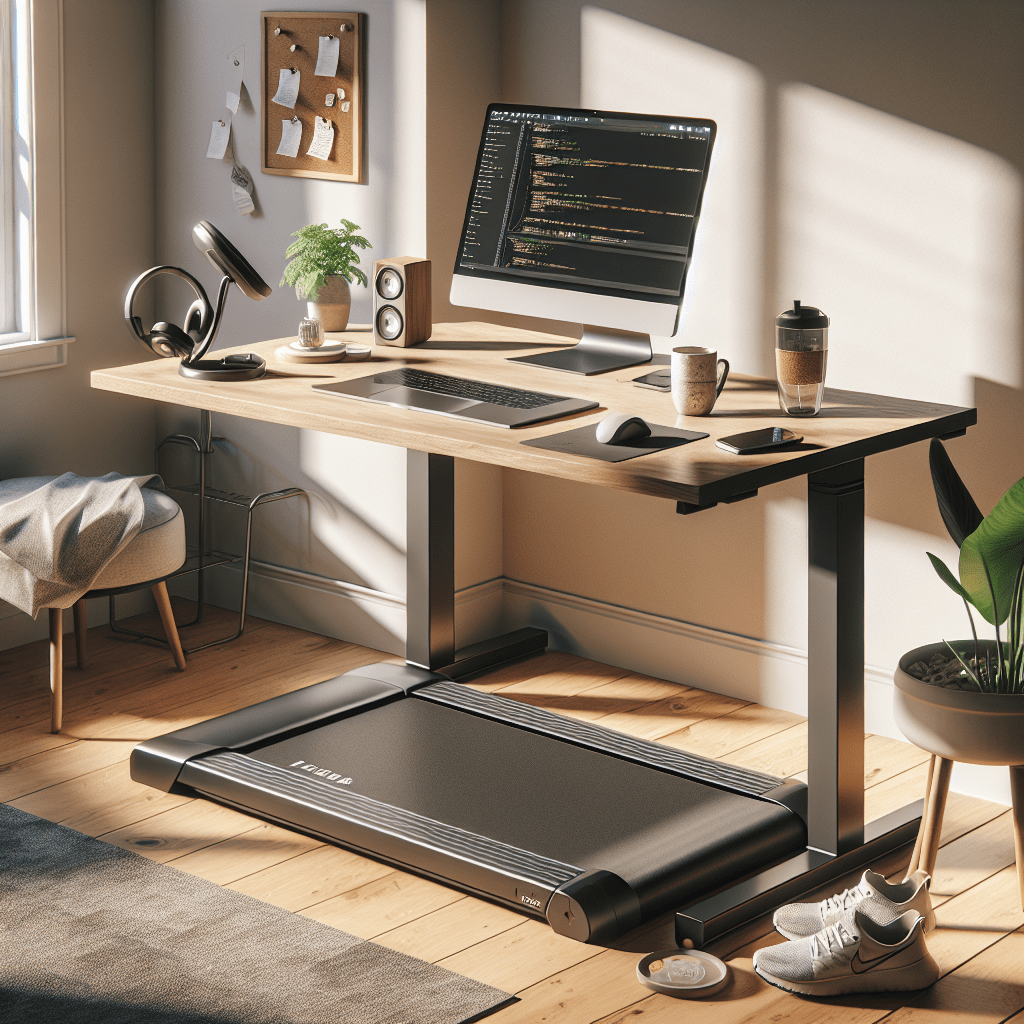
TL;DR: Coding while walking is not only possible, it’s a surprisingly effective way to stay active during long workdays. With a standing desk and treadmill combo, you can boost your daily step count, maintain cognitive focus, and reduce the health risks of a sedentary lifestyle—just be ready to adapt your workflow a bit.
Sitting all day is the new smoking—at least, that’s what countless studies and headlines keep telling us. As a software engineer, I spend hours glued to a screen, and despite regular gym sessions, I started to feel the toll of prolonged sitting. So I decided to try something different: combining a standing desk with a walking treadmill.
This post is a personal account of how I made it work, what changed in my daily routine, and a few hard-earned tips for anyone curious about coding while walking.
My Setup: Standing Desk Meets Treadmill
I use the FLEXISPOT standing desk, which offers smooth height adjustments and enough surface area for dual monitors, keyboard mouse with wrist rest supports (which surprisingly helps with helping keyboard/mouse accuracy whilst moving). Underneath it, I’ve placed a compact, quiet under-desk treadmill—the UREVO Walking Treadmill. It’s surprisingly sleek, fits perfectly under the desk, and runs quietly enough not to interrupt calls or my own train of thought.
I typically walk at a pace between 1.5 to 2.5 mph. That’s fast enough to keep my body moving but slow enough to type comfortably without turning my IDE into a typo minefield.
Yes, You Can Code While Walking
At first, it felt like trying to thread a needle on a moving train. Mouse precision took a hit, and I quickly realized that walking and pixel-perfect clicking don’t mix well. So I leaned into keyboard-driven workflows.
Here’s what helped:
- Keyboard shortcuts: I doubled down on keybindings in my editor and OS.
- Shell efficiency: I use
zshwith syntax highlighting and autocomplete to speed up terminal commands. - Custom scripts: Automating repetitive tasks helped reduce the need for mouse navigation.
Cognitively, I didn’t notice any drop in problem-solving ability. If anything, walking helped me stay alert during long debugging sessions. For deep-focus tasks, I slow the treadmill down or pause it briefly. Once I have a plan, I ramp back up into a steady walk and let momentum carry me through implementation. I’ll be honest I don’t use it all day, for me I tend to use it for the morning only.
Lessons Learned the Hard Way
Some of the most valuable insights came from trial and error—especially the kind that leaves you limping the next day.
- Always wear shoes: I tried walking barefoot once. After 30 minutes, my feet felt like they’d done a firewalk. Blisters are not worth the “grounded” experience.
- Start slow: Coordination takes time. Begin at a snail’s pace and gradually increase the speed as you get comfortable.
- Hydrate more: You’ll sweat more than you expect, even at low speeds. Keep water nearby.
- Ergonomics matter: Adjust your monitor height and keyboard angle to avoid neck and wrist strain. A good anti-fatigue mat helps when you’re not walking too (actually keeps you from bumping around at higher speeds).
Why It Matters: Movement Is Medicine
Sitting for hours at a time is linked to a higher risk of heart disease, diabetes, and even early death. Adding a treadmill to my work routine helps me sneak in thousands of extra steps daily, without cutting into productivity. It also complements my gym sessions, creating a more balanced, active lifestyle.
This is about more than just burning calories. Walking while working keeps blood flowing, boosts energy levels, and helps fight the sluggishness feeling that can creep in later in the day. And for those of us who love our craft but don’t want to sacrifice our health for it, it’s a sustainable middle ground.
Key Takeaways
- Coding while walking is absolutely doable, especially with a bit of practice and the right tools. (Have heard that some people do not think this is possible but with practice it can be done)
- Keyboard-first workflows are key: Rely less on the mouse and more on shortcuts, scripts, and terminal tools.
- Start slow and wear shoes: Comfort and coordination take time to build.
- Hydration and ergonomics matter: Small tweaks make a big difference over hours of use.
- Walking adds meaningful activity to your day without sacrificing deep work.
Final Thoughts
Integrating a standing desk and treadmill into my workflow has been a game-changer. It’s not just about burning calories or hitting step goals—it’s about reclaiming movement in a job that often demands stillness. If you’re a developer, designer, or anyone who spends long hours at a desk, I highly recommend giving it a try.
Got questions or your own setup to share? I’d love to hear about it. Let’s keep moving—literally.
📚 Further Reading & Related Topics
If you’re exploring boosting productivity while coding on a treadmill with a standing desk, these related articles will provide deeper insights:
• Why Software Engineers Should Consider Staying Physically Active – This article highlights the cognitive and physical benefits of regular movement for developers, reinforcing the value of integrating exercise into your workday.
• Standing Up for Your Health: The Benefits of a Standing Desk for Developers – A deep dive into how standing desks can improve posture, focus, and long-term health for software professionals.
• Maximizing Productivity with the Pomodoro Technique: A Developer’s Guide – Learn how time management techniques like Pomodoro can complement physical work setups to further enhance productivity and focus.






 Scalable Human Blog
Leave a comment