
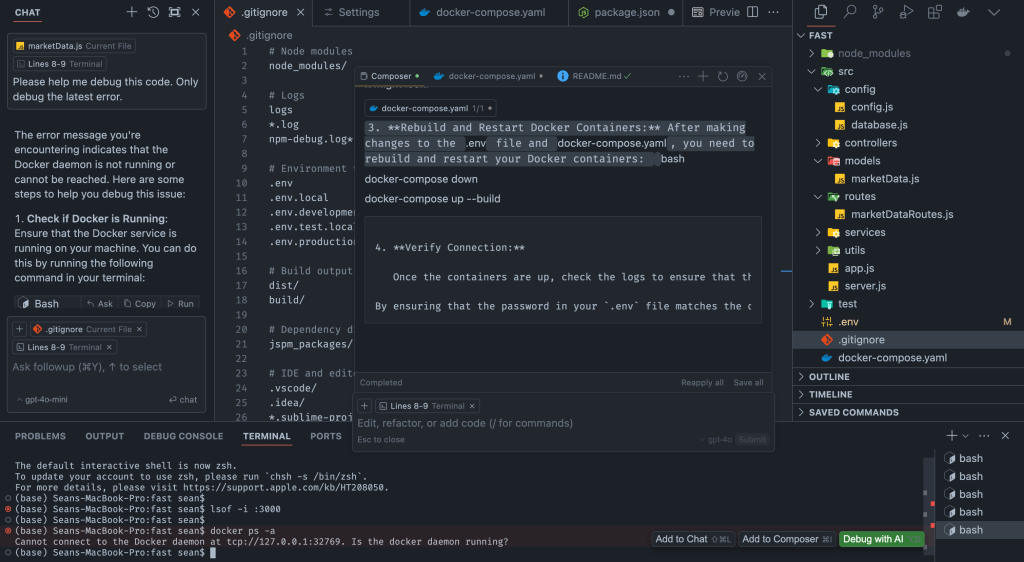
The way developers approach problem-solving is evolving rapidly. Over the last 24 hours of using Cursor IDE, built as a fork of VS Code, I’ve seen how AI integration is not just a novelty but a necessity that’s reshaping the workflows of the modern software engineer. Cursor goes beyond being a mere code editor; it feels like stepping into the future of software development. This blog will explore my experience with Cursor, interweaving insights from Lex Fridman’s podcast episode featuring the Cursor team, and dive into broader implications of this transformative tool.
A Shift in Mindset for Developers
From my first moments with Cursor, it became clear that this tool demands a new way of thinking. Traditional problem-solving workflows, which often involve scouring the web for documentation or debugging threads, are streamlined by Cursor’s ability to use AI as an active participant in the coding process. Unlike GitHub Copilot or standalone AI chat models, Cursor integrates AI seamlessly into the IDE itself. You don’t have to leave the environment to ask questions or seek guidance—it’s all happening in one place.
This integration changes how developers iterate through issues. With Cursor, the AI doesn’t just point you in the right direction; it applies changes dynamically. This makes development faster and less prone to the distraction of context-switching. It allows you to trust the AI’s recommendations but still gives you the ability to verify using documentation or deeper research when needed—avoiding the hallucinations that often plague AI-generated answers.
Game-Changing Features
Cursor’s ability to create entire project structures, including folders and requirements, is a standout feature. Imagine being a product owner in an Agile world: you provide a list of requirements, and within minutes, Cursor gives you a working scaffold for your project. While it won’t be a turnkey solution, it dramatically accelerates the initialization phase of development, setting the stage for productive work.
Another powerful feature is the integration of error handling into the terminal output. Instead of manually copying errors into an external chat interface like ChatGPT, Cursor lets you interact directly with the error messages in the IDE. This eliminates friction and enhances productivity, a major leap from tools like Copilot.
The Problem with Copilot
This brings me to GitHub Copilot. While Copilot has been a trailblazer in AI-assisted coding, its approach feels static compared to Cursor. Copilot lacks Cursor’s deep integration and dynamic application of AI-driven changes. Moreover, Copilot is locked into a single chat model, which could hinder innovation in the long run. Cursor, on the other hand, is model-agnostic—you can use any chat model that suits your needs.
My experience with Cursor leveraged ChatGPT, which I’m familiar with and find reliable. However, the ability to switch models, depending on the task, opens possibilities for even greater optimization. This flexibility is where Cursor stands out, offering a tailored experience for diverse developer workflows.
Insights from the Lex Fridman Podcast
The Cursor team shared fascinating insights during their conversation with Lex Fridman, many of which resonated with my experience:
• Token Prediction Accuracy: Fine-tuning prompts and improving token prediction is a subtle but essential skill in AI coding. This directly influences the quality of AI outputs. From my exploration of microservices interacting with ChatGPT, I’ve seen firsthand how context refinement can significantly improve responses.
• AI as an Agent: Cursor envisions AI not just as a helper but as an autonomous agent capable of handling background tasks like refactoring, testing, and debugging. This aligns with my experience of the terminal-driven interactions in Cursor—AI is no longer just a static tool but an active partner.
• Ethical Oversight: A critical challenge is preventing the generation of malicious or harmful code. I see potential for AI IDEs to integrate security scanning features, automatically flagging vulnerabilities like CVEs in generated code. This could be complemented by review-heavy processes to ensure ethical and secure development practices.
RLAIF: A New Era of AI Optimization
Reinforcement Learning with AI Feedback (RLAIF) could be the next frontier in AI tool optimization. Unlike RLHF, which relies on human feedback to refine AI behavior, RLAIF uses feedback from other AI systems. This iterative process could make AI tools smarter, faster, and more aligned with developer needs. By using synthetic data and AI-generated feedback loops, RLAIF has the potential to outpace traditional reinforcement learning methods, pushing the boundaries of what AI can achieve in software development.
Conclusion
In just 24 hours, Cursor has shown me what the future of software development could look like. Its seamless integration, flexibility with AI models, and innovative features make it more than just an IDE—it’s a productivity enhancer that changes how we work. Comparing Cursor to tools like Copilot, it’s evident that the bar for AI-assisted development is rising.
The podcast with the Cursor team highlighted the challenges and opportunities of this new era, from token accuracy to ethical considerations. As developers, we’re entering a phase where AI is not just a tool but a collaborator, requiring new skills and workflows.
Cursor feels like a glimpse of the future. The question is not if tools like this will become the norm—it’s how quickly we’ll adapt to this new way of working. And with innovations like RLAIF on the horizon, the evolution of AI-driven development is just getting started.
📚 Further Reading & Related Topics
If you’re interested in modern IDEs and the future of software development workflows, these related articles will provide deeper insights:
• 5 Reasons I Chose Cursor AI Over VS Code: A Developer’s Honest Review – Explore a detailed comparison of Cursor IDE and VS Code, highlighting the advantages and trade-offs of AI-assisted development environments.
• Mastering ChatGPT Prompt Frameworks: A Comprehensive Guide – Learn how AI-driven tools like Cursor IDE leverage advanced prompting techniques to enhance productivity and streamline coding tasks.








 Scalable Human Blog
Leave a reply to How AI-Enhanced IDEs are Changing the Game – Scalable Human Blog – Sky Forbes Cancel reply