
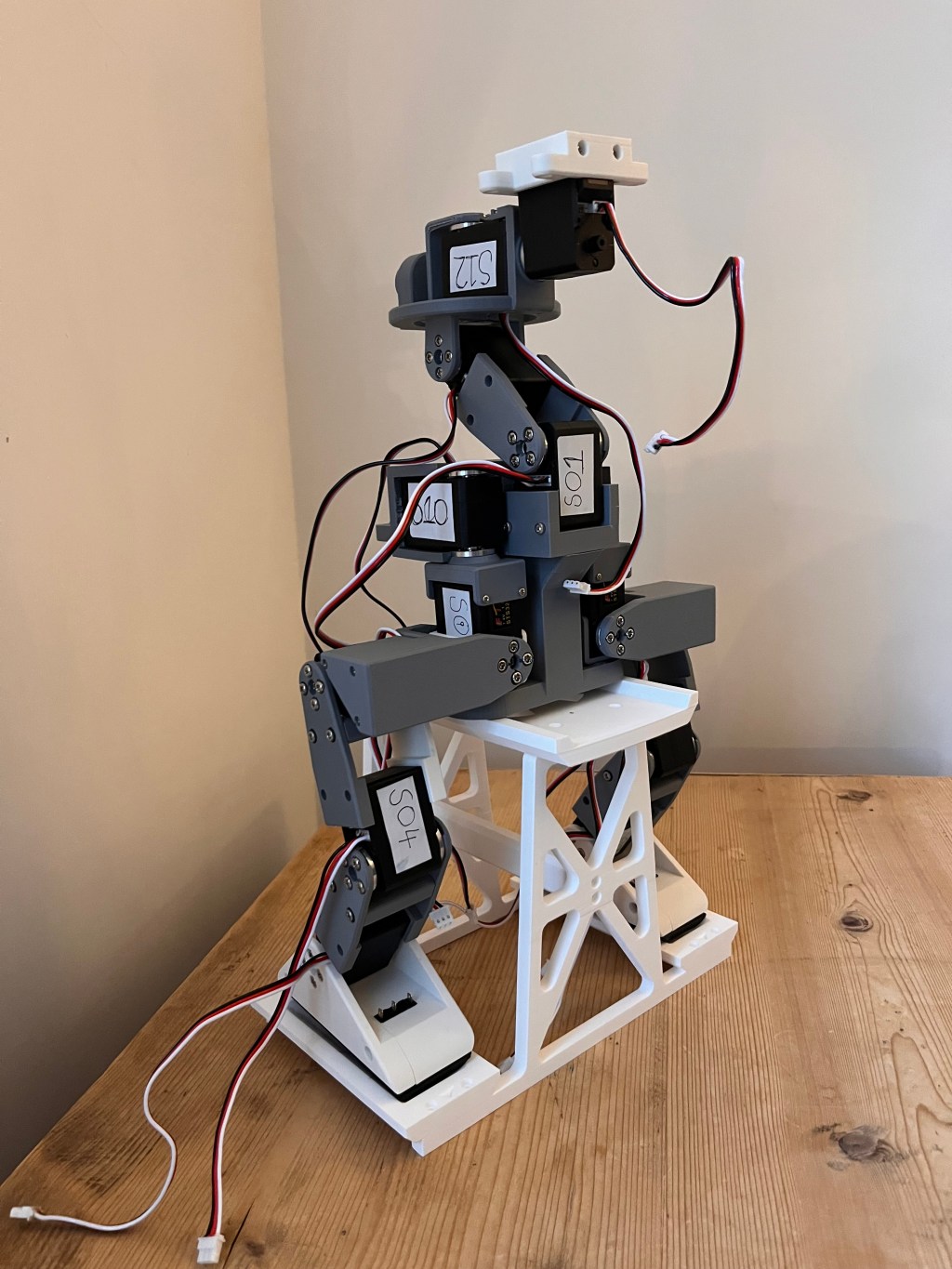
TL;DR: The Open Duck Mini V2 has moved from printed parts to a mostly assembled robot body with a working power pack and 14 configured servos. It is not walking yet, but the build has already taught me a lot about hardware, soldering, power, and the gap between software confidence and physical reality.
In my first post about starting Open Duck Mini V2, I wrote about moving from software development into the much messier world of building a physical robot.
This follow up is about what happened next.
The short version: the robot is now starting to look like a robot. The longer version: I have broken parts, reprinted parts, wired a power pack, configured servos, damaged a Raspberry Pi header, and learned that hardware has a very direct way of telling you when your assumptions are wrong.
From printed parts to robot structure
All 49 required printed parts are now complete, along with the optional flexible TPU foot bottoms. That alone feels like a milestone.
For a while, the project was just trays of parts, bags of screws, printed brackets, and browser tabs. Now the main servo assemblies are fitted through the body, legs, neck, and head.
I have been following the official Open Duck Mini V2 assembly guide, which has been the main reference for the mechanical build and wiring layout. Credit is due to the original project here. Even with good instructions, there is a big difference between reading a step and physically getting parts, wires, screws, and tolerances to cooperate.
Seeing the frame come together has been genuinely rewarding. It is still not walking, but it no longer feels abstract. It has a shape. It has joints. It has cables. It looks like the machine I imagined when I started.
The first real breakage
One of the earlier setbacks came from a battery holder.
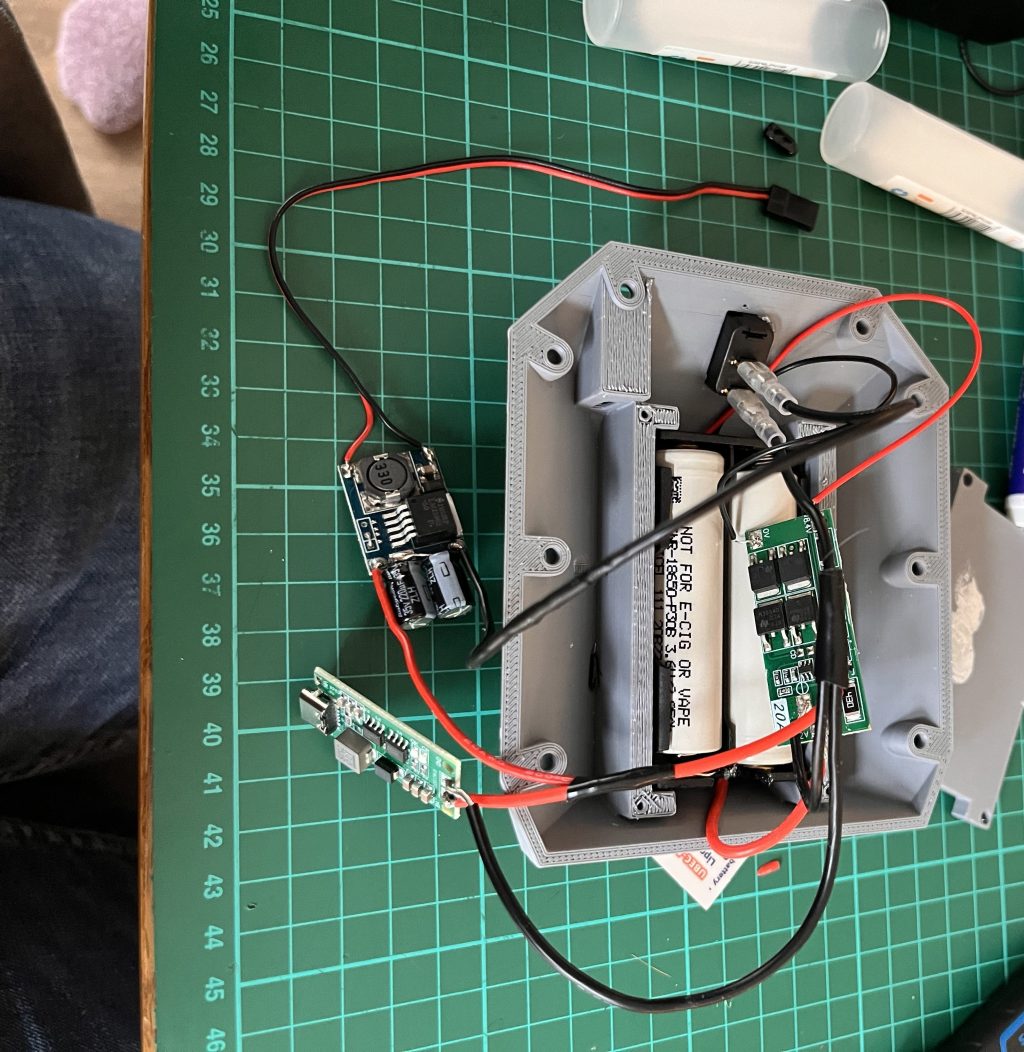
The holder I had was too large for the printed rear panel. I tried to fit it anyway, which was a mistake. The panel cracked.
Looking closer, the failed print also had a weak section where I had changed PLA filament partway through. It looked complete, but it was not strong enough in practice.
So I reprinted the panel and sourced a smaller holder that actually fitted.
That small failure taught me a lot:
- A finished print is not automatically a usable part
- Fit matters as much as the CAD model
- Changing filament mid print can create weak points
- Physical compatibility needs checking before force is involved
In software, a bad assumption might throw an error. In hardware, it can snap the part in your hand.
Building the power pack
The power pack has been one of the most valuable parts of the build so far.
I assembled the two cell 18650 pack, connected the battery management board, wired the midpoint connection, installed the power switch, added the USB C charging board, and connected the regulator that supplies 5 V.
I also created a separate battery voltage branch for the servo controller.
This was slow work, partly because I was new to it and partly because I did not want to be casual around lithium cells. I used a multimeter repeatedly to check the switched outputs and confirm that the expected voltages appeared where they should.
The USB C charging board is wired, but I still need to perform a controlled charging test. That is staying on the cautious side of the list until I am ready to verify it properly.
Configuring 14 servos, one at a time
The robot now has 14 main servos connected and labelled S01 to S14.
I configured each one individually using my laptop and the Waveshare serial bus controller. Each servo was assigned a matching ID, then checked again after power cycling.
That last part became important.
At one point, a servo appeared to accept its new ID. The command succeeded. The response looked fine. Then I removed power, reconnected it, and the servo had reverted.
The fix was in the script sequence: unlock EEPROM, write the setting, then lock EEPROM again. After correcting that and verifying each servo after a power cycle, the IDs stayed put.
That was a useful software meets hardware lesson: a successful response does not always mean the setting has been saved permanently.
Wiring, routing, and the hidden work of neatness
The servos are now daisy chained, and all 14 have responded to status checks.
I have also recorded their physical joint locations and centred the horns before assembly. That step felt important because small alignment errors now can become confusing movement problems later.
Cable routing has become its own part of the build. The goal is simple to describe and harder to do:
- Keep wiring tidy
- Leave enough slack for joints to move
- Avoid pinching cables
- Make future debugging possible
- Do not create a knot inside the robot
This is one of those hardware tasks that does not look dramatic in photos, but it affects everything later.
I have been keeping notes, scripts, photos, component details, and lessons in my Open Duck Mini build journal. That journal has already saved me from forgetting what I changed, what worked, and what still needs checking.
Troubleshooting beyond software instincts
A few issues have reminded me that my software instincts are useful, but incomplete.
At one point, the servos responded to commands but barely moved. My first instinct was to suspect a command problem, a motor issue, or a configuration mistake.
The real problem was simpler: the battery was nearly empty.
The diagnostic values we were looking at did not make that obvious, which made the issue feel more mysterious than it was.
Later, a centre command sent an assembled hip towards a mechanical stop. I disabled torque immediately. That still needs investigation before I attempt more powered movement.
For now, I am treating it carefully. It does not automatically prove a bad servo or incorrect assembly, but it does mean I need to understand the joint mapping, offsets, limits, and startup behaviour before the robot moves under power again.
Learning to solder the hard way
Soldering has been the most humbling part of the project.
I came into this as a software developer. I am used to mistakes that can be fixed with undo, a branch reset, or a better test. Soldering is different. The mistake stays hot, small, and very real.
Wire stripping, tinning, soldering small connections, and undoing bad joints all took practice. Not enough practice, in hindsight.
The biggest mistake happened while working on the Raspberry Pi Zero 2 W GPIO header. I damaged several header pins. The Pi still booted, Wi Fi worked, and I could connect over SSH, but the board is no longer something I fully trust for the next stage.
So I ordered a replacement Raspberry Pi Zero 2 W with the GPIO header already soldered.
It was an expensive lesson, but a useful one. Next time, I would spend much more time practising on spare components before touching the actual board.
The Pi milestone still counts
Even with the header mistake, getting the Pi running felt like progress.
The operating system is installed. Wi Fi works. SSH works. I can connect remotely.
That means the next stage is no longer theoretical. Once the replacement Pi arrives, I can move into runtime setup, configuration, and calibration using the official Open Duck Mini V2 runtime documentation.
That will be the bridge between assembled hardware and controlled motion.
Before any attempt at coordinated movement, I want to check:
- Servo ID mapping
- Joint directions
- Neutral offsets
- Mechanical limits
- Startup behaviour
- Power stability
- Safe torque enable and disable behaviour
The robot is not ready to walk. But it is getting closer to being ready to test carefully.
Why the build journal matters
One thing I am glad I started early is the habit of documenting the build.
Photos, notes, small Git commits, wiring records, and test scripts have made the process less fragile. When something goes wrong, I can look back and see what changed.
That matters because hardware learning is easy to lose. You think you will remember which wire went where, or which servo was tested, or which script worked. Then a week passes, and the details blur.
The journal turns messy progress into something I can build on.
Key Takeaways
- Hardware progress is not just assembly. It includes fit checks, wiring, testing, failures, and rework.
- A successful command response is not always enough. Verify servo settings after a power cycle.
- Power issues can look like software issues. Check battery state and voltage before chasing complex explanations.
- Soldering deserves practice time. Learn on spare parts before working on boards you care about.
- Documentation pays for itself. Photos, scripts, and notes make troubleshooting much easier later.
Conclusion
This stage of the Open Duck Mini V2 build has been both satisfying and frustrating.
The robot now has a body, legs, a head, a power pack, and 14 connected servos. It is visibly becoming the machine I set out to build. At the same time, every mistake has reminded me that physical projects demand patience in a way software often does not.
The next step is runtime installation and careful integration. No dramatic walking attempt yet. Just steady progress, better checks, and a little more respect for the hardware.
📚 Further Reading & Related Topics
If you’re exploring building and assembling Open Duck Mini V2 robotics hardware, these related articles will provide deeper insights:
• Embracing Robotics in the AI Era: A strong companion piece for anyone moving from software into hands on robotics. It gives context on why robotics is becoming increasingly valuable for developers experimenting with physical builds.
• Incorporating AI and Blockchain in IoT Healthcare and Supply Chain: This article connects well with robotics projects through its focus on IoT systems and connected hardware. It helps expand the discussion from assembling components to thinking about how smart devices communicate and operate in real world environments.
• How to Become a CPU Programmer: Useful for readers interested in the lower level computing concepts behind hardware control. While Open Duck Mini focuses on assembly and servos, understanding hardware oriented programming can help deepen confidence when working with embedded systems and robotic components.





Leave a Reply